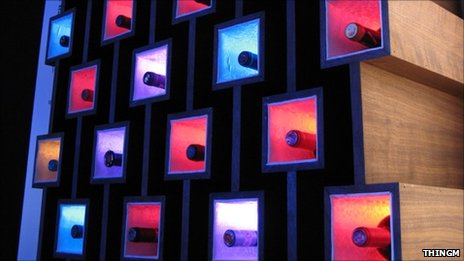
BlinkM in the Teapotty!

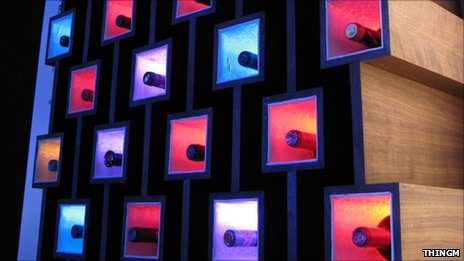
http://www.youtube.com/watch?v=QqprceAk4fs The Teapotty is a teapot sitting on a servo which takes readings from a magnetometer which is influenced by neodymium magnets in a cup.  The magnetometer takes the reading from the north position, plays a bit of something similar to the Tetley Tea tune and then moves to a new position - where the teacup moves to. BlinkM RGB LEDs indicate the new position of the teapot by changing colour based on the teapot's new position from 0-180 degrees. I made some polymorph diffuser covers for them & also added heart confetti to emphasise the feeling of heartwarming happiness a cup of tea can bring!

To read the the artists own reads please visit:  http://rainycatz.wordpress.com/2011/09/17/teapotty-electronic-teapot-exploration-for-chi-tek-at-the-va/

Sketching and Hardware 2011

Sketching and Hardware 2011

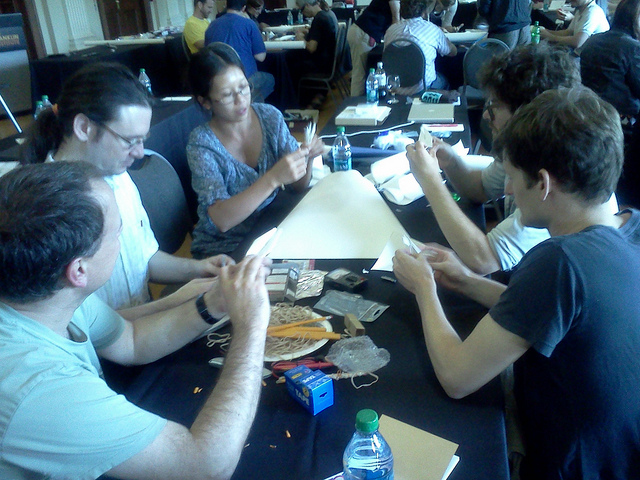
This year was the sixth annual Sketching in Hardware summit on toolkits for exploring interaction design with digital hardware that Mike annually organizes and that ThingM sponsors. This years' event took place in the amazing Franklin Institute in Philadelphia, PA. You can see who attended and download many of the presentations from it here:

http://www.sketching11.com/presentations/

ThingM LinkM + BlinkM Desk Project!

Project: LED Glass Desk

By: Mike LaGrasta first posted on Instructables

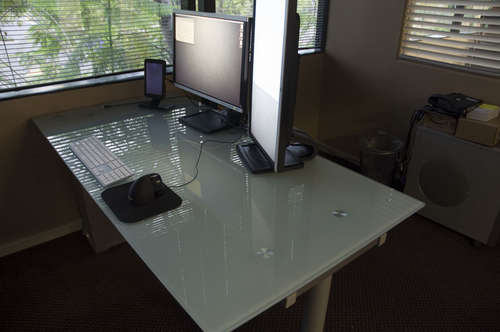
Mike LaGrasta first posted on Instructables After being given a frosted glass top desk at work, I thought it would be cool to set up some led powered visual notifications. I coded up a crude NodeJS server to listen for incoming events and a Growl "notification style" to send commands to some BlinkM lights.

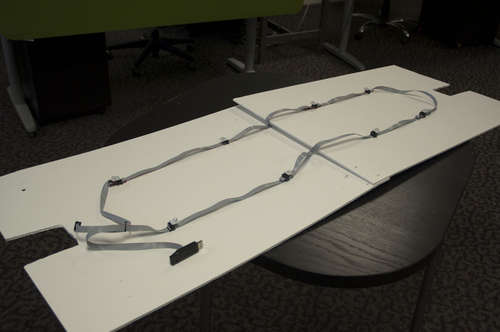
What I used: * Ikea Galant desk * Custom Software (available on GitHub.com at https://github.com/mnlagrasta/DeskLights ) * Growl Software * 8 BlinkM RGB LEDs from ThingM * LinkM USB controller from ThingM * 9 IDC 5x2 Crimp Connectors * 10 feet of ribbon cable * 2 sheets of foam core * a bit of tape, twist ties, and zip ties

What I did: * Crimped the IDC connectors evenly spaced along the ribbon cable * Plugged in the controller to one end, usb to that, set the led channel ids * Started up the server software * Configured Growl (non-mac users will have to find another way to send commands to the server) * Watched the pretty lights * Punched some holes in the foam core boards and attached the lights where I wanted with the twist ties * Strapped the foam core (lights side up) to the bottom of the desk using zip ties around the metal supports

Notes: * The commands sent to the server are really just web page requests sent to the right port. You could use all kinds of other programs to send those commands such as lwp, wget, etc. * Growl styles are somewhat limited if you can't program Cocoa. So I made a "WebKit Style" and set the CSS background image to "http://127.0.0.0:8124/growl", which is the page request that will tell the server to blink the lights red one time. * I couldn't figure out where to buy it, but ThingM has added a WireM kit that would replace my not-quite-correct 5x2 IDC connectors.

Invisible Accent Light with BlinkM MaxM & FreeM

Sometimes you just want a little extra light in a room. With RGB LED tape, you can put light anywhere. But controlling its brightness and making it the color you want is a bit harder. A BlinkM MaxM can easily control LED tape, either as a stand-alone device, with an Arduino, or your computer via a LinkM. Stand-alone mode is great if you want a specific color or color pattern (the BlinkMSequencer makes this really easy) For this installation, I added a FreeM to the MaxM to let you control the light with a standard infrared TV remote control. Accent Light with BlinkM MaxM & FreeM

Another nice thing about the LED tape is that when it’s off, you can’t see where it’s installed.
Here’s a video showing how it all works.

How to make this

First up is to wire up the RGB LED tape with extension wires to go from the tape to the MaxM. This is so you can hide the MaxM where ever you feel like. Cut the wires to the length you need and solder them to the LED tape and a 4-pin male header like in the photo below. Note because the LED tape switches the Red and Green lines you’ll need to switch them because MaxM’s lines go V+,R,G,B.

Accent light with BlinkM MaxM FreeM

With that done, you should be able to hook everything up and have the MaxM drive the LED tape. The LED tape takes +12VDC. The amount of current it needs depends on the length of tape your driving. Chances are you have a 12VDC @ 1000 mA wall wart power supply from an old piece of computer gear. That should work fine.

If you want your accent light to play a constant color or color pattern, you’re now done and can place the LED tape where ever you like, like on top of a window sill. Peel off the sticker backing and stick the LED tape where it should go.
Accent light with BlinkM MaxM FreeM

Adding FreeM

If you want to go the step further and add a FreeM to give your light a remote control, then follow the steps on the Using FreeM with BlinkM MaxM page.

But it’s really not much more than plugging the FreeM into the bottom of the MaxM.

Accent light with BlinkM MaxM FreeM
FreeM with MaxM

Microsoft Makes Hacking Kinect Easier

Tod Kurt, the Co-Founder of ThingM has been recently interviewed by NPR for a great hacking article. Read the full transcript below or visit the link to listen! MICHELE NORRIS, host:

Microsoft is embracing what might otherwise be considered outlaw behavior - at least with its popular motion sensor for Xbox, called Kinect. Kinect lets you play games by moving your body; no controller needed. And since its release late last year, it has been extremely successful.

But not only gamers are buying it. Computer engineers and hobbyists have hacked the Kinect to do all sorts of things - browse the Web with a nod of your head, turn music up with a flick of the wrist, and lots more.

Alex Schmidt reports that at least for the Kinect, Microsoft says the more hacking, the better.

ALEX SCHMIDT: In a dark, crowded workspace in West Los Angeles, two men flailed their arms around in front of a white wall.

(Soundbite of conversation)

SCHUMIDT: The sensor of the Microsoft Kinect was pointed at them, but they couldn't get it to pick up their movements. They tried crouching down lower, lifting their heads higher. And finally...

Unidentified Group: Yay.

(Soundbite of laughter)

SCHMIDT: They've only just started playing with the machine, and brainstorming the endless things they might be able to do with it. One of the techies says we'll have sensors like these in our homes, and they'll be able to tell family members if we fall down. Another suggests conducting virtual orchestras.

Tod Kurt was pondering his own killer Kinect app.

Mr. TOD KURT (Founder, ThingM): It's very exciting. I think the sensor that's in the Kinect is an amazing piece of engineering. And it's kind of unheard of that we're able to get access to it at such a price point.

SCHMIDT: It used to be that to experiment with motion capture technology, you'd have to spend thousands of dollars. The Kinect costs 150 bucks, and gives tinkerers access to the motion capture research Microsoft has already done.

Mr. MARK BOLAS (Director, Institute for Creative Technologies, USC): I have two wrenches here.

SCHMIDT: Mark Bolas is a director at the Institute for Creative Technologies at USC.

Mr. BOLAS: I remember getting this wrench with my father when I was 13 or 14 years old. And then with it, I could start working on my bicycle. And I got into motorcycles and all these things that I could build. The wrenches of today aren't physical. They're the software wrenches.

SCHMIDT: Giving developers the wrenches to the Kinect was a calculated decision by Microsoft. They could have encrypted the system but decided not to.

Shannon Loftis is studio head at a Microsoft group that developed the Kinect. They launched November of last year.

Ms. SHANNON LOFTIS (Studio Manager, Microsoft Game Studios): And in less than a week, KinectHacks.net was up. And everybody who had anything to do with Kinect in Microsoft was glued to that site every single day. And every single day, some new innovation got circulated, and everybody kind of dropped their jaws in amazement.

SCHMIDT: One of the hacks let people move a robot using their bodies. Another let you fingerpaint by waving your hands through the air. Loftis says for Microsoft, opening the system up to everyone else's creativity makes good business sense.

Ms. LOFTIS: Now, customer will buy Kinects. And at the center of the whole revolution, in the way that people are interacting with machines, is a device that Microsoft owns.

SCHMIDT: Stacey Holmes(ph) considered buying one himself. He's in a wheelchair following spinal surgery.

Unidentified Woman: The gems are going to light up, and just touch them in the order in which they light up.

Mr. STACEY HOLMES: OK.

SCHMIDT: At a USC clinic in Long Beach, he played a Kinect game for physical therapy, stretching his arms out to grab virtual gems inside a mine shaft.

Mr. HOLMES: It causes you to try things at a pace and a precision that you wouldn't otherwise try to do. And so that and the grandkids, yeah, I'd probably try this at home.

(Soundbite of laughter)

SCHMIDT: Microsoft's approach to the Kinect is part of a generational shift in the tech industry. Letting other people in to tinker with inner workings could become the default for big companies, rather than building old-fashioned walls for control.

For NPR News, I'm Alex Schmidt.

(Soundbite of music)

ROBERT SIEGEL, host:

This is NPR News.

http://www.npr.org/2011/07/11/137773337/microsoft-makes-hacking-kinect-easier

ThingM MaxM in “Current”


“Current: Technology+Contemporary Claycraft” by: Virginia Pfau MFA Ceramics Candidate, School for American Craft, Rochester Institute of Technology


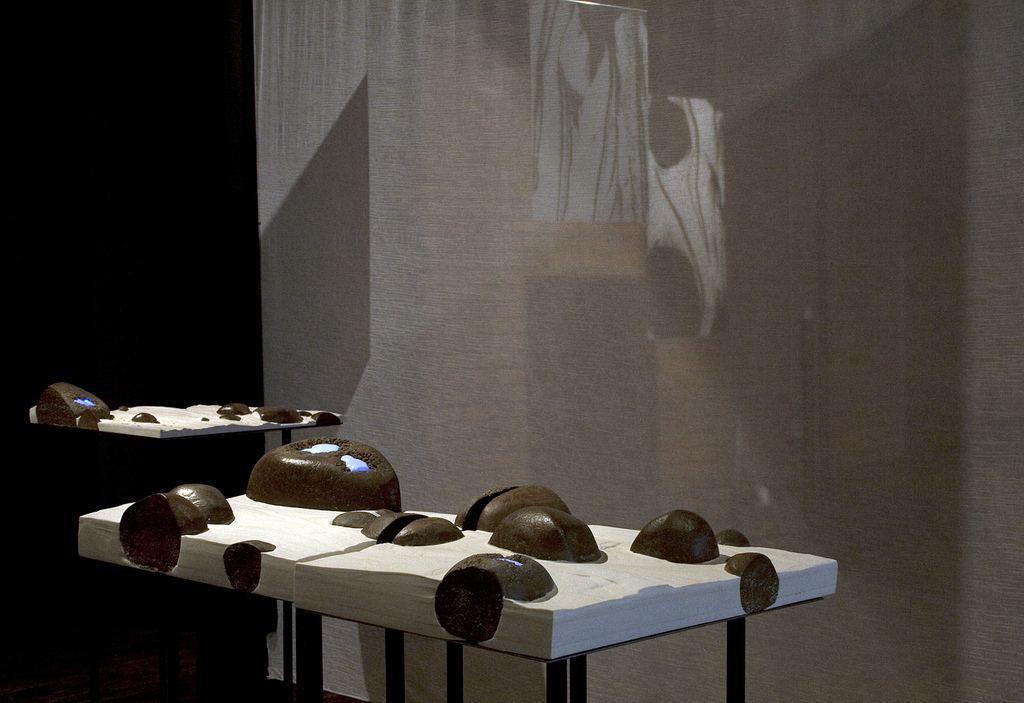
For my MFA thesis work, I chose to explore the integration of technology into the ancient art of clay sculpture. I dug a ton or so of mud from the local Genesee River boat dock, and formulated a paperclay out of it.  I used this clay to make rock-like forms, and blasted some of them at my “weatheration station” in the studio, using water-erosion to create holes and textures. I then used Hydrostone, a material cousin to plaster, and a ramp system I rigged in my workspace to simulate the movement of water in a stream around the stones. I was able to control the composition of the stones in each piece, and to some extent the movement of and lines painted by the hydrostone as I poured it in layers around them, but I also enjoyed letting gravity do some of the artwork.

Since the stones were hollow, partly for weight and firing issues, partly to accommodate the lights, I heat-inlaid plastics into them and put combinations of ThingM blinkM and MaxM LEDs inside, programming them to pulsate gently with a soft blue light to match the visual speed of the “water”. I also added the occasional hint of a red or green to the lights, a simple task with the easy-to-use computer program I downloaded from the website. I coated the inside of each lighted stone with a reflective silver mylar to allow maximum light to flow out through the semi-opaque white plastic. I ran the LED lights off battery packs as demonstrated on the: http://todbot.com/blog/2011/02/25/blinkm-battery-pack-howto/ link, and wired together several MaxM Blaster Units off single Masters so that all the components could fit in the sculptures with multiple lighted rocks.

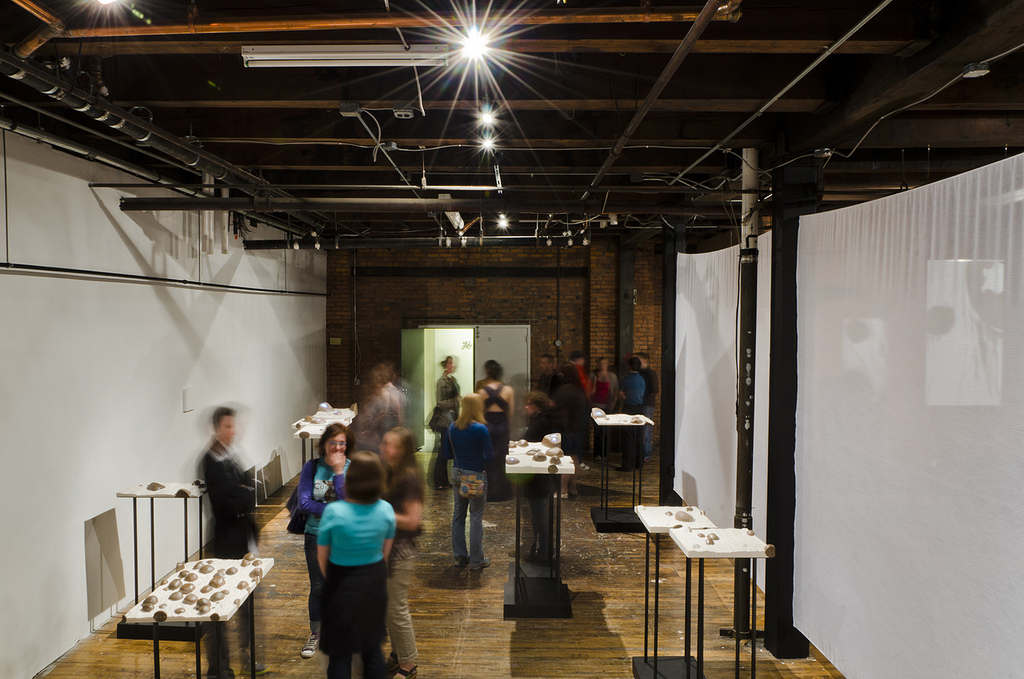
My thesis opening was held May 6 in a room I had rented at an old warehouse in Rochester. I had about 350-400 visitors attend the show, and they seemed to enjoy the work immensely. In the past several years at school, I had done a few other projects involving lights and LED’s, but I was always at odds as to what to do about the power source, and had received criticism when I showed the power cords, as with a piece I did with two wall outlet cords, or another piece I did with solar-powered LEDs. Using the ThingM products allowed me not only to entirely hide the power source for the lights, but also to control the patterns and colors of the lights in my sculptures. I was delighted to watch the public enjoy my sculptural installation, gaze at the pulsing lights, and then look underneath to find nothing but a steel plate.

For more photos and videos please visit: http://www.flickr.com/photos/va-pfau/5759732618/in/photostream

BlinkM Cylon mkII

For Maker Faire this year I made a second version of my BlinkM Cylon: BlinkM Cylon mkII. This is not a very cost-effective way of getting a Cylon effect. It however is a good way of showing how to wire up multiple BlinkMs with a long cable, using our new WireM cabling kit for BlinkM. And unlike normal Cylon circuits, this has full RGB color effects and gradual fading.

BlinkM Cylon mkII

Here’s a quick video showing it in action.

BlinkM Cylon mkII consists of:
- 13 BlinkMs (one for each of the tribes of Kobol)
- one WireM cabling kit for BlinkM, consisting of IDC connectors & ribbon cable
- an Arduino
- two 4.7k resistors
- a single push-button
- 9VDC wall wart to power it all.
- laser cut acrylic enclosure

Below are all the files needed to recreate your own BlinkM Cylon. Click any of the images for larger versions.

Firmware

The sketch that runs on the Arduino is pretty straight-forward. It’s a minor update to the existing BlinkMCylon sketch. You can find it on the blinkm-examples Google code project. The files are:

- BlinkMCylon.pde – the actual sketch
- BlinkM_funcs.h – BlinkM library

Circuit

The circuit is 13 BlinkMs and one Arduino hooked up to a single 4-wire I2C bus (Gnd/+5V/SDA/SCL). Like this:

BlinkM Cylon mkII

Because the I2C bus is fairly long, two pull-up resistors on SDA (aka ‘d’ on BlinkM) and SCL (aka ‘c’) are added.

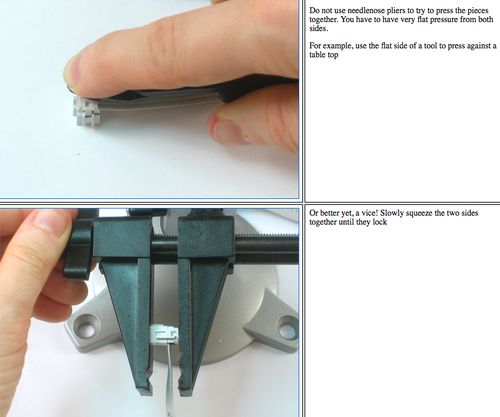
To assemble the cable, position the IDC socket connectors where you want them, and crimp them together. For the BlinkM Cylon, the connectors are spaced about 3″ apart. For info on how to crimp the connectors, see the bottom of the Adafruit USBtinyISP page, here’s a highlight

Enclosure

The enclosure is made from laser-cut acrylic. It’s mostly clear 1/8″ (3mm) acrylic with the diffuser made from 1/16″ (1.5mm) acrylic ceiling fixture diffuser sheet. The plans for cutting your own of these are available in EPS and CDR format from Thingiverse, they look like:

To secure the BlinkMs, little BlinkM holders were created. Each BlinkM is hot-glue tacked to the holder and the holder is snapped into the base plate. The entire laser cut assembly is meant to snap together. To keep it together use rubber bands, some dabs of super glue, or proper acrylic cement to make a permanent installation.

BlinkM Cylon mkII BlinkM Cylon mkII
BlinkM Cylon mkII